Copyright © 2006,2007,2008,2009 Peter Soetens, FMTC
Copyright © 2010-2012 Peter Soetens
Permission is granted to copy, distribute and/or modify this document under the terms of the GNU Free Documentation License, Version 1.1 or any later version published by the Free Software Foundation, with no Invariant Sections, with no Front-Cover Texts, and with no Back-Cover Texts. A copy of this license can be found at http://www.fsf.org/copyleft/fdl.html.
Table of Contents
This document describes the Orocos OCL::ReportingComponent for monitoring and capturing data exchanged between Orocos components.
![[Note]](images/icons/note.png) | Note |
|---|---|
Since version 2.6, the ReportingComponent has had a makeover to boost efficiency and to rework non-periodic and snapshot modes. For periodic reporting, the behavior remained the same. |
Each Orocos component can have a number of data ports. One can configure the reporting components such that one or more ports are captured of one or more peer components. The reporting components can work sample rate based, event based, or by requesting a snapshot of the current state. A number of file formats can be selected.
The Reporter can use buffers in order to log all data it receives or just report the last values in case it is flooded with data. By default, the Reporter will setup unbuffered connections and you need to override this manually if you wish to deviate from that.
A common usage scenario of the OCL::ReportingComponent goes as follows. An Orocos application is created which contains a reporting component and various other components. The reporting component is peer-connected to all components which must be monitored. An XML file or script command defines which data ports to log of each peer. When the reporting component is started, it reads the ports and writes the exchanged data to a file at a given sample rate or when new data is written.
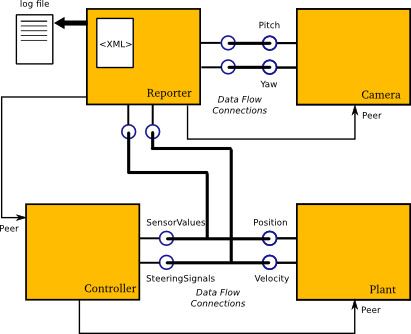
One can not use the OCL::ReportingComponent directly but must use a derived component which implements the method of writing out the data. There exists a number variants: OCL::FileReporting for writing data to a file and OCL::ConsoleReporting which prints the data directly to the screen. The OCL::NetcdfReporting writes the NetCDF file format. In order to support other file formats, you can write your own marshaller.
The OCL::ReportingComponent is configured using a single XML file which sets the component's properties and describes which components and ports to monitor.
In order to report data of other components, they must be added as a Peer to the reporting component.
The following deployment XML file creates a Reporting component as in the example above (Figure 1, “Component Reporting Example”):
   <simple name="Import" type="string"><value>ocl</value></simple>

  <struct name="Reporter" type="OCL::FileReporting">

    <!-- Note: Activity may also be non-periodic -->
    <struct name="Activity" type="Activity">
      <simple name="Period" type="double"><value>0.01</value></simple>
      <simple name="Priority" type="short"><value>0</value></simple>
      <simple name="Scheduler" type="string"><value>ORO_SCHED_OTHER</value></simple>
    </struct>
    <simple name="AutoConf" type="boolean"><value>1</value></simple>
    <simple name="AutoStart" type="boolean"><value>0</value></simple>
    <simple name="AutoSave" type="boolean"><value>1</value></simple>
    <simple name="LoadProperties" type="string"><value>reporting.cpf</value></simple>
    <!-- List all peers (uni-directional) -->
    <struct name="Peers" type="PropertyBag">
      <simple type="string"><value>Controller</value></simple>
      <simple type="string"><value>Camera</value></simple>
    </struct>
Note that the AutoSave flag is turned on (this is optional) to save the settings when the Reporter component is cleaned up by the Deployer.
If the Reporter has a periodic activity, it will sample all its input ports and write out the current values.
If the Reporter's activity is non-periodic (Period omitted or
zero), it will only write out a new value when new data arrives
on one of the connected ports. Ports that did not get a new
value will repeat the previous value.
Also the values of attributes or properties can be logged.
This is an example property file, to configure a Reporting component, once it was created :
<?xml version="1.0" encoding="UTF-8"?>
<!DOCTYPE properties SYSTEM "cpf.dtd">
<properties>
  <simple name="WriteHeader" type="boolean">
    <description>Set to true to start each report with a header.</description><value>1</value>
  </simple>
  <simple name="Synchronize" type="boolean">
    <description>Set to true if the timestamp should be synchronized with the RTT::Logger</description><value>0</value>
  </simple>
  <simple name="WriteHeader" type="boolean">
    <description>Set to true to start each report with a header.</description><value>1</value>
  </simple>
  <simple name="ReportFile" type="string">
    <description>Location on disc to store the reports.</description><value>reports.dat</value>
  </simple>

  <struct name="ReportData" type="PropertyBag">
     <description>A PropertyBag which defines which ports or components to report.</description>
     <simple name="Component" type="string">
        <description>Report all output ports of this component.</description><value>MyPeer2</value>
     </simple>
     <simple name="Port" type="string">
        <description>Report this output port</description><value>MyPeer.D2Port</value>
     </simple>
     <simple name="Data" type="string">
        <description>Report this property/attribute</description><value>MyPeer.Hello</value>
     </simple>
  </struct>
</properties>
If WriteHeader is set to true, a header will be written
describing the file format layout.
The ReportData struct describes the ports to monitor.
As the example shows (see also Figure 1, “Component Reporting Example”),
a complete component can be monitored (Camera) or specific ports of
a peer component can be monitored. The reporting component can monitor
any data type as long as it's typkit is loaded in the Orocos type system (use ROS' rtt_rosnode or
typegen to generate typekits).
The property file of the reporting component must be read with the loadProperties script method:
marshalling.loadProperties("reporting.cpf")
You can not use readProperties() because only
loadProperties loads your ReportData struct into the
ReportingComponent.
With
marshalling.writeProperties("reporting.cpf"), the current configuration can be written to disk again.
The scripting commands of the reporting components can be listed using the this command on the TaskBrowser. Below is a snippet of the output:
    RTT::Method     : bool reportComponent( string const& Component )
   Add a peer Component and report all its data ports
   Component : Name of the Component
  RTT::Method     : bool reportData( string const& Component, string const& Data )
   Add a Component's Property or attribute for reporting.
   Component : Name of the Component
   Data : Name of the Data to report. A property's or attribute's name.
  RTT::Method     : bool reportPort( string const& Component, string const& Port )
   Add a Component's OutputPort for reporting.
   Component : Name of the Component
   Port : Name of the Port.
  RTT::Method     : bool screenComponent( string const& Component )
   Display the variables and ports of a Component.
   Component : Name of the Component
  RTT::Method     : void snapshot( )
   Take a new shapshot of all data and cause them to be written out.
  RTT::Method     : bool unreportComponent( string const& Component )
   Remove all Component's data ports from reporting.
   Component : Name of the Component
  RTT::Method     : bool unreportData( string const& Component, string const& Data )
   Remove a Data object from reporting.
   Component : Name of the Component
   Data : Name of the property or attribute.
  RTT::Method     : bool unreportPort( string const& Component, string const& Port )
   Remove a Port from reporting.
   Component : Name of the Component
   Port : Name of the Port.